Small-Apps und Small AppsSmall-Apps vs. Small Apps

Als wir Small-Apps gründeten, da gab es noch kein Sony Android Feature mit Namen Small App, ja selbst Android war noch jung. So überrascht es nicht, dass unser Name nichts mit dem Sony Feature zu tun hat. Da wir iPhone und Android Apps entwickeln, könnten wir ja auch eine Sony Small App machen, ist aber aktuell nicht geplant.

Ein anderer Effekt dieser Doppelbelegung ist unser schlechter gewordener Google Such-Ergebnis-Rang. Jahrelang waren wir auf dem ersten Platz bei allen Suchen nach Small Apps, jetzt gibt es auch den einen oder anderen Eintrag zum Thema Small App.

Wir freuen uns, dass wir mit unserem Namen einen Trend setzen konnten, auch wenn diese Ehre inzwischen in der Masse unterzugehen droht. Das ist nun mal der Fortschritt und seine Auswirkungen.When we named our company Small-Apps, there was no such thing as a Sony Android feature called Small App. And even Android was still young. So it comes as no surprise, that our name has nothing to do with that Sony feature.

Will we ever program a Sony style Small App? I have no idea, why not. Currently, this is not on our plan, however.

Another impact of that name clash is our Google rank. For years now, we had been sitting on the top rank of the google search when searching small apps or small app. As a result of the Sony feature, a lot of people are now using this term and our search rank is going lower and lower.

Sometimes change hurts, even when we all profit from progress in the long run. We hope, that you will be able to find our company in the future as well.

APT 17: List of all Objective-C Methods in a ClassAPT 17: List of all Objective-C Methods in a Class

Some time ago I was trying to remember a method name that I wanted to call in order to achieve the desired effect. Usually the Xcode app is able to list all the possible methods, but I had some errors in the file, so Xcode was confused and I could not fix all of it at the same time. So I decided, that I should implement a method, that lists all possible methods of a given class.

This is relatively easy in Objective-C, since the method names are inside every program, because the name resolution is done at runtime in Objective-C. All I had to do was implement some code fragment like this:

 #import <objc/runtime.h>
 ... 
 Class elem = [objectToBeListed class]; 
 while (elem) {
     NSLog(@"%s", class_getName( elem ));
     unsigned int numMethods = 0;
     Method *mList = class_copyMethodList(elem, &numMethods);
     if (mList) {
         for (int j=0; j < numMethods; j++) {
             NSLog(@" %s", 
                 sel_getName(method_getName(mList[j])));
         }
         free(mList);
     }
     if (elem == [NSObject class]) {
         break;
     }
     elem = class_getSuperclass(elem);
 }

This gives a fairly long listing of all methods of your class and all its super classes.

And it also revealed some humor from the Apple guys, when I listed a UIViewController Class. Because in the listing there I found the following class name (broken in to smaller pieces for better readability):

attentionClassDumpUser:yesItsUsAgain:
althoughSwizzlingAndOverridingPrivateMethodsIsFun:
itWasntMuchFunWhenYourAppStoppedWorking:
pleaseRefrainFromDoingSoInTheFutureOkayThanksBye:

If you find that hard to read, here is the readable version of that „sentence“:
attention Class Dump User: yes Its Us Again: although Swizzling And Overriding Private Methods Is Fun: it Wasnt Much Fun When Your App Stopped Working: please Refrain From Doing So In The Future Okay Thanks Bye:

To swizzle is computer-speak for changing something, for „messing around“. Although I had not planned to swizzle with any pointer or to override any method, I did feel like this sentence was directed to people like me, dumping the list of methods.

Of course, the documentation does not list this function. And there is no such function in Mac OS X, so this is an iPhone „feature“.

Spaß mit iTunes 11Fun with iTunes 11

Heute morgen war mir ein bisschen nach Wintermusik, also habe ich Al di Meolas Platte Winter Nights aufgelegt. Natürlich nicht als Platte oder CD, sondern auf meinem Laptop als Song(-Liste) auf iTunes. Um genau zu sein, als iTunes 11 auf meinem Laptop mit der Musik aus meinem iTunes Match „iCloud“ Bereich. Denn leider ist auf der Festplatte meines Laptops kein Platz mehr für Musik. Und da ich zu faul war, die Musikanlage anzuschalten, habe ich die Musik auf dem Laptop gehört.
Was mir zuerst auffiel, war wie wunderbar alles klingt. Nun habe ich „diesen“ Laptop ja noch nicht so lange. Und iTunes 11 auch noch nicht, daher weiss ich nicht wirklich, ob es die von Apple gelobten „verbesserten Lautsprecher“ meines Laptops sind, oder ob iTunes 11 so viel besser ist. Eine kurze Suche zeigte mir, dass Apple den Equalizer eingeschaltet hat – ich jedenfalls kann mich nicht erinnern, ihn in meiner letzten Version von iTunes eingeschaltet zu haben.

Natürlich ist mein Sound immer noch davon abhängig, wo ich gerade meine Hände auf der Tastatur habe, denn wenn sie genau über den Lautsprechern sind, dann ist der Klang tatsächlich schnell schlechter. Aber im Normalfall ist der Klang tatsächlich viel, viel besser, als vorher. Und das liegt sicher nicht daran, dass mein Gehör über Nacht durch das Konzert von „Cab Ride Fiction“, der Band meines Sohnes Jonathan bestimmt noch etwas schlechter ist, als sonst schon. Egal, der Sound gefällt mir, ich genieße ihn.
Nun ist mein Interesse an der neuen Version von iTunes geweckt, ich blättere durch meine Musik, und nachdem Al die Meola und sein Mitspieler (von dem in den iTunes-Übersichten kein Wort steht – tja echte CD-Hüllen sind immer noch besser) fertig sind, starte ich das neueste Album von Feist, und scrolle weiter durch meine Musiksammlung. Als ich auf die Fleet Foxes treffe, beschliesse ich das Feature ‚zu „nächste Titel“ hinzufügen‘ auszuprobieren und füge das Album der Fleet Foxes hinzu. Etwas weiter unten lacht mich ein Genesis Coverbild an und ich füge Genesis „Duke“ zur Playlist hinzu. Schliesslich passt „Duchess“ und „Duke’s travels“ auch zu meiner Stimmung. Noch weiter unten fällt mir John Mellencamp ins Auge und sein Album „Mr. Happy go Lucky“ kommt auch noch auf die Playlist. So, erst mal genug für die nächsten Stunden, ran an die Arbeit.

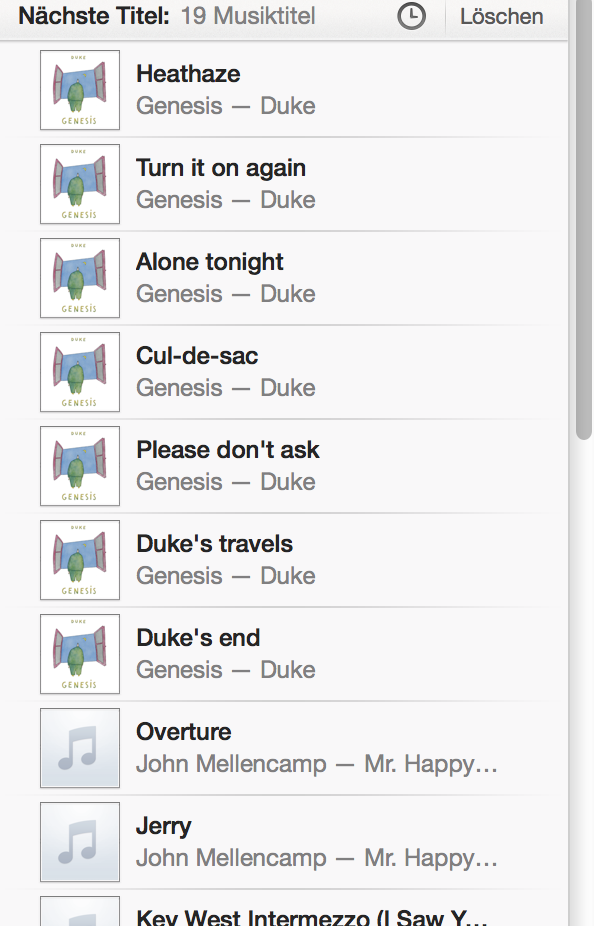
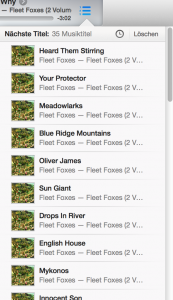
Als nach Leslie Feist die Fleet Foxes kommen läuft alles nach Plan – eine lange List an Songs, über 35 Stück wartet auf mich. Etwas verwirrt bin ich dann allerdings, als die Fleet Foxes nach einem Song von Genesis abgelöst werden. Nanu? Hatte ich eben nicht alle Songs des Albums der Fleet Foxes in der Playlist gesehen? Schnell nachgeschaut, nein, nur noch Songs von Genesis und John Mellencamp in der Liste. Aha, neue Software, neue Funktionen, neue Bugs. Tja, der „normale“ Alltag für uns Software-Entwickler. Leider.

Noch verwunderter bin ich dann allerdings, als nach dem ersten Stück von „Genesis“ wieder ein Song vom „Fleet Foxes“ Album kommt. Schnell nachgeschaut. Nun sind wieder alle „Fleet Foxes“ Stücke in der Liste, die auch wieder die richtige Länge hat. Nanu? Was ist denn hier los? Habe ich vielleicht Zufallsspielen angestellt? Nachgesehen, nein, alles so wie es sein sollte – Zufall ist aus, es ist der normale Modus. Ich fühle mich an den Testbericht von Stiftung Warentest erinnert, die verwundert feststellten, dass beim Musikspieler des Huawei-Smartphones alle Stücke dem Alphabet und nicht der Reihenfolge nach abgespielt wurden. Im Bericht nennen sie es „seltsame Macke“ – ich würde das schlicht einen Bug nennen, denn das ist es – egal ob es die falsche Voreinstellung und somit Änderbar oder ob es eine nicht abstellbare Macke ist.

Und als mein iTunes 11 damit weiter macht, jeweils immer einen Song der einen und dann einen Song der anderen Platte zu spielen und zwischendurch auch noch die Zahl der in der Playliste vorhandenen Songs zu ändern, weiss ich, dass es auch für diese „seltsame Macke“ von iTunes 11 nur eine erlaubte Bezeichnung gibt: Bug. Tja, leider weiss ich auch, dass man Bugs nur beheben kann, wenn man sie nachvollziehen und somit ihre Quelle durch Ändern und Testen finden kann. Schliesslich habe ich erst letztens bis in die Nacht an einem Bug fixing gesessen. Wer weiss schon, ob jemals jemand die gleiche Situation (iTunes 11, iCloud, diese und jene Playlisten…) und den gleichen Fehler haben wird. Auf alle Fälle habe ich jetzt bewiesen bekommen, dass die Songs der Fleet Foxes und und vom Genesis Album Duke nicht besser werden, wenn man sie mischt, denn in Beiden Alben sind die Songs doch eher zum eigentlichen Vorgänger und Nachfolger abgestimmt, als zum jeweiligen Pendant im anderen Album. Kein Wunder, liegen doch immerhin 25 Jahre zwischen 1984 (Duke) und 2009 (Fleet Foxes).

Während ich das hier tippe läuft der drittletzte Song von „Duke“ und ich frage mich, wie iTunes weiter machen wird, wenn „Duke“ zu Ende ist. Werde ich dann „Fleet Foxes“ und „John Mellencamp“ gemischt bekommen? [Edit:] Ja! [/Edit] Und was passiert nach den Fleet Foxes? Immer wenn die gerade dran sind, enthält die Playlist noch alle Genesis Alben. Könnte ich so Genesis mit Genesis mischen, wenn ich sie 2x dazu gefügt hätte? Können Sie mir folgen? Immerhin habe ich zwei screenshots gemacht, die die verschiedenen Situationen zeigen, falls ich doch noch ein Bug bei Apple eingebe.

Aber Bugs hin oder her: Der Klang ist geil. Viel besser als bei meinem alten Laptop. Das versöhnt. Einen gesunden, friedlichen und versöhnlichen 1. Advent wünsche ich Euch, mir und der ganzen Welt.
Gruß, Thomas

[Edit:] Es fehlten noch die Links zu „Cab Ride Fiction“ und Ihren kostenlosen Song-Downloads bei Myspace und Facebook. [/Edit]

MacBook Pro 15″ (Version „late 2008“) mit 8GB RAMMacBook Pro 15″ (late 2008) with 8GB of RAM

For four years now I had been living in belief, that my notebook can not address more than 4GB of RAM, due to the used chipset and that only one of the later Macbook Pro models could be upgraded to 8GB.

Due to the high RAM prices, this was a theoretical issue at the time when I bought the laptop in November 2008 (it was the 27.11.2o08, I remember, because it was a frustrating day for me and buying this laptop was meant to be the start of my career as a freelancer and company founder). So I opted for 2GB and later put in 4GB.

Lately, with Mountain Lion as the operating system on computer, Xcode 4.5 was getting very memory consuming. I had days, when debugging code meant to re-start Xcode every 2 hours, to prevent Xcode from eating up 3.5 GigB of my 4Gig ram, since once it does so, the system is painfully slow until you stop Xcode.

When lately one of the laptop fans got stuck, I opened the laptop case, gave him a little „go“ and all was fine again. Just to check for the prices of repair fans, I visited the respective Macbook/Pro Website at ifixit.com. There I read, that this notebook was OK to take 8GB of RAM. I double checked, with apple’s site. There it stood: 4GB. Who to believe?

After some time, it was clear, that this new, that the machine can indeed take 8GB of RAM was correct if you had a newer operating system and one of the newer Bios versions. Now the fan was irrelevant. YES. I MUST HAVE IT! I MUST HAVE 8GB!

But wait! Where are the prices today? A quick check revealed: Some charge $99 for 8GB, some 33€ plus shipping! I finally paid something in between. And since that day, I have a totally new machine. Quick, powerful, fun to work with, totally silent, but: 4 Years old (soon).

Some thoughts at the end:
I still can remember checking the prices for 16kbit and 64kbit RAMS and buying my own 64kbit RAM chips. Eight of them I needed – in order to have RAM for the self-designed Z80 Computer with a huge 64 Kilobyte of RAM I was working on (and never finished, because soon after starting the project I got my hands on real Unix computers at the TU Berlin).

Löschen des Papierkorbs führt zum SystemabsturzDeleting the (Files in the) Trash crashes Mountain Lion

I had not deleted the files in the trash for quite a while. One of the reasons was, that once the trash was getting crowded, deleting all the files would take quite a while. So I delayed it more and more

Yesterday I decided, it is time to fight the fear of loosing files and delete the trash. Of course, I did start a backup session first. When this was done, I started to empty the trash. Since it said „97030 files“, I decided it is OK to leave the computer on it’s own and go to bed. Coming back the next morning, the computer was frozen. It showed a password screen, but didn’t work any more.

I rebooted.

It did not boot.

I stopped the computer again, this time pressing the „alt“ key on the computer while booting. I selected the repair option (can’t remember the exact text, sorry) and first did a check of my disk drive. It turned out to be OK. Then I had the choice:
– reinstall from backup
– reinstall OS X 10.8 Mountain Lion

My thoughts where:
– Only reinstalling the OS would be quicker and I would keep all my non backed-up files. But depending on where the problem really is, this would mean I have no idea if some of my files got lost.
– Reinstalling from Backup would definitely restore all files in the backup.

So I decided to reinstall the computer from backup over firewire 800. First it said 16 hours remaining, but then it was done after 4 hours.

Luckily, it worked – but with some strange flaws: An attached USB stick was not writable, the Finder did not show the computer itself, and some graphical flaws were apparent. Stay tuned…

Anruf von +49 800 575 2050

Heute kam ein Anruf von der Telefonnummer +498005752050. Eine Frauenstimme sagte man sein von der Vodafone Vertragsoptimierung und demnächst sei doch bei meinem Vertrag ein neues Handy fällig, darüber wollte man mit mir reden. Ich stutzte.

Nun kommen Telefonwerber bei mir selten über den ersten Satz hinaus, da habe ich schon aufgelegt. Ein typisches Telefonat mit mir verläuft so:
„Spreche ich mit Herrn Thomas“ <Klick>

Diesmal kam aber kein „Spreche ich mit…“ oder ich war unkonzentriert, ich weiss nicht mehr. Ich fragte noch einmal nach: „Von welcher Firma sagten Sie rufen Sie an?“ – „Vodafone“.
Das machte keinen Sinn für mich. Vodafone verwendet keine 800er Nummern. Die verwenden immer 172-Nummern. Die Dame redete weiter, während ich etwas unkonzentriert ein Browserfenster zur Online-Suche nach der Telefonnummer öffnete: „…(gekürzt)… dann bräuchte ich nur noch von Ihnen zum Abgleich das KUNDENKENNWORT“.

Und schon war ich wieder wach! Ich fühlte mich wie einer der Studenten, wenn ich mitten in einer Vorlesung das Wort „Zombie“ verwende. Plötzlich schauen alle von Ihren Laptops hoch.

Nee, sowas! Endlich habe ich mal das Glück und so ein blöder Betrüger-Trupp ruft mich mal an! Yipiee! Das macht ja doch noch Spaß!

„Nein, danke, soweit kommt es noch. Das gebe ich Ihnen natürlich nicht. Schon gar nicht, wenn Sie angerufen haben!“ <Klick>

Und schon bedauerte ich, aufgelegt zu haben. Das hätte doch noch nett werden können, aushorchen, verscheissern, und so weiter. Egal.

Ich habe dann mal unter der Nummer „zurück“gerufen – da geht nur ein Band ran, „…ausserhalb unserer Sprechzeiten an“. Aha. Na hoffentlich kassieren die nicht auch noch Geld unter der Telefonnummer von mir! Es sind ja nicht alle 800er Nummern kostenlos, oder? Tja, wieder nicht aufgepasst…

Als ich merkte, dass ich unter der Telefonnummer weder bei der Bundesnetzagentur noch woanders finden konnte, wer dahinter steckt (vielleicht ist die Nummer neu, vielleicht habe ich nicht gut genug gesucht), habe ich erst mal eine Beschwerde bei der Bundesnetzagentur eingereicht und den Vodafone Kundenservice von dieser Nummer und Ihren Machenschaften unterrichtet. Wenn man schon das Glück hat, mal Lügner (meiner Meinung nach) am Telefon zu haben, dann sollte man dieses Glück auch nutzen, dachte ich mir.

Neulich, als mein Sohn einen Anrufer fragte: „Sind Sie eine Umfrage?“ und als Antwort bekam „Nein, wir wollen uns bedanken“ gab er gutmütig das Telefon weiter. Meine Frau hat dann auch nur einen Satz später aufgelegt. Daraus entstand die Diskussion, warum Leute so etwas machen? So einen Job, bei dem man andere Leute offensichtlich belügen, vielleicht sogar bescheissen muss. Und was man solchen Leuten wünschen sollte. Die bisherigen Vorschläge reichen von „ein Gewissen“ bis „möge Ihr Tod wenn es eines Tages soweit ist, ein qualvoller sein“. Am besten gefällt mir dieser Vorschlag, den ich mir hiermit zu eigen mache:
„Ich wünsche Ihnen die Kraft, eine Gewerkschaft zu gründen und Ihren Arbeitgeber (auf mehr Lohn, …) zu verklagen.“

Nachtrag: Dass so ein Business Modell nicht funktioniert, hat schon Abraham Lincoln gesagt: „You can fool some of the people all of the time, and all of the people some of the time, but you can not fool all of the people all of the time.“.
Und Seth Godin teilt die gleiche Erkenntnis – vielleicht hatte auch er einen solchen Anruf: http://sethgodin.typepad.com/seths_blog/2012/08/long-term-manipulation-is-extremely-difficult.html

Nachtrag 2: Am 16.8. kam der zweite Anruf von dieser Nummer. Die haben also auch noch eine schlechte Kundenverwaltung, sonst wüssten sie ja…

APT16: Correct program crashes in reviewAPT16: Correct program crashes in reviewAPT16: Correct program crashes in reviewAPT16: Correct program crashes in review

First, I wanted to name this article Correct program crashes at Apple, but then I realized that this was not a story about the APPLE review team but a story about the apple REVIEW TEAM. And of course about a bug, but mentioning that in the title would spoil the milk before the end of the story. So let’s get started.

I had submitted a new version of Regattakalender. As a sailor, one of my hobbyist side-projects had been this iOS app, that lists all sailing regattas of Germany that want to get listed in order to help me or other sailors plan their sailing season. Of course, the app is only available in German due to it’s regional character.

When the app got rejected because of crashing on an „iPad3,3“ I was shocked. I had tested all available hardware versions EXCEPT the „new iPad“ – simply because I do not own one. So was there something different? I had used parallel processing, synchronization with semaphores and other tricks to make sure that the customer gets the quickest possible response. And when this crash message came, my immediate reaction was: Let’s search for the race condition. This machine is faster than anything I have – this may have revealed a race condition in my parallel programming, that I simply hadn’t been aware of. I have seen so many examples of this problem pattern, that I spent a whole night looking through my code. I found nothing.

Some days later, when an iPad3 crossed my paths, I pulled out my Laptop and tested for the bug. The party guests at this birthday party where not amused of me showing my „nerdiest face“, but, hey, iPads from party visitors come and go, so you better use your time while you can. It turned out – in no way I could reproduce the error. It just did not fail. No crashes. It ran better than on the other apple products I had tested it before. So much for my theory.

In a very depressed mood, I wrote the apple review team, that I could not find any error and that I had no idea what to do. I had corrected an error that the iPad showed a different icon than I wanted, but this was very likely not the reason for the crash. Unnecessary to say that this message from me was not helpful, but I obviously wrote it for personal relief. After a few minutes a message arrived from the review team. They had made a video of the app trying to start and crashing on their iPad. You could see the person filming it with a black iPhone 4 / 4S running the app on the iPad and being reflected in the iPad screen. And you could see that he (it looked more like a male person) had a cubicle with a bookshelf. I was positively motivated to try harder to find the error – much to the discomfort of all the other party guests.

When I had corrected the icon error, I was getting aware of the configuration being different for the iPad than for the iPhone. So I went through all the configurations and configuration files to check whether they contained some things that were „looking suspicious“. Since an iOS configuration consists of so many details, there is a lot to be looked at, but I was trying to find something that would be different for the iPad or for the review version, when compared to the version I was using for testing.

When I stumbled over the optimizer settings, some hope returned: The crash logs that the review team had sent me had strange numbering for the lines, may be the optimizer had mixed something up? I tested with the optimizer settings turned the same for testing and distribution: Nothing, still everything was working. I put the settings back to original settings (always only change one parameter at a time for testing, else you will never know which one was the reason for the cure) and scrolled down.

And then it hit me: The setting for automatic reference counting (ARC) being applied was different for distribution! I could resist my urge to test the corrected settings, because I know the law of error testing:

    You can not prove the absence of an error. You can prove its existence. And when the error is gone after the change, then it is plausible, that the change made the error go away. But it is only plausible, not proven.

And in order to see the error go away, you have to be able to reproduce it first. You have to. Else you have no reason to believe that the error was fixed. So I changed the setting for „Objective-C Automatic Reference Co…“ (so I had to guess what this means until I saw the help text at the right hand side: „CLANG_ENABLE_OBJC_ARC“) to: „NO“ for testing as well. And guess what? It crashed! Yippie!

So I corrected me settings, recompiled submitted and … started to party again.

So I am happy that the review team exists and I did not ship a broken app to my customers. And that they took the time for the video, which motivated me.

So what did I learn from this?
– When I agree to upgrade my project to whatever „new“, I will double check the settings afterwards to find any glitches
– When I prepare my program for submission, I will now test the distribution version and not only test the debug version and then compile for distribution. Anyone any ideas how to run the .app file in the .xcarchive file?
– The guys from the app store test team are not only useful (I knew that before), but actually helpful.

APT15: NSKeyedUnarchiver initForReadingWithData: data is NULLAPT15: NSKeyedUnarchiver initForReadingWithData: data is NULLAPT15: NSKeyedUnarchiver initForReadingWithData: data is NULLAPT15: NSKeyedUnarchiver initForReadingWithData: data is NULL

Lately, we had the following error:
*** -[NSKeyedUnarchiver initForReadingWithData:]: data is NULL

What had we done to get this error?
It turned out, that the reason was a loop in which multiple calls of

UIImageWriteToSavedPhotosAlbum ([assets objectAtIndex:currentIndex], self, @selector(image:didFinishSavingWithError:contextInfo:), nil);

had been sitting. We checked the documentation – not a single mention, that multiple calls could be a problem. On the other hand – that it is asynchronous, that was clear through the callback. And thus we decided to „serialize“ our problem, as can be seen below. Problem gone.

Explanation: The action starts with saveButtonPressed, when the call to UIImageWriteToSavedPhotosAlbum is ready it sends a image:didFinishSavingWithError:contextInfo: method-message to the given class and in that method we trigger the next write, if there still is one…

Have a look yourself:

- (void) image: (UIImage image didFinishSavingWithError: (NSError error contextInfo: (void contextInfo {
NSLog(@"didFinishSavingWithError");
if (error != NULL) {
NSLog(@"error");
}
currentIndex++;
if (currentIndex < [assets count]) { UIImageWriteToSavedPhotosAlbum ([assets objectAtIndex:currentIndex], self, @selector(image:didFinishSavingWithError:contextInfo:), nil); NSLog(@"currentIndex %i",currentIndex); } } -(IBAction)saveButtonPressed:(id)sender{ NSLog(@"saveButtonPressed"); currentIndex = 0; UIImageWriteToSavedPhotosAlbum ([assets objectAtIndex:currentIndex], self, @selector(image:didFinishSavingWithError:contextInfo:), nil); NSLog(@"photos saved"); }

Spot the error: Can you quote correctly?Spot the error: Can you quote correctly?Spot the error: Can you quote correctly?Spot the error: Can you quote correctly?

In an attempt to make my many programming experiments last and live longer than my hard disk might live, I wanted to create a remote copy of my git repositories.

So I programmed the following line

for i in *; do if test -d $i/.git; then (git clone --bare $i /Volumes/Backup/Git/$i.git); fi; done

Of course I had a problem, that I had not expected. Can you spot it? It is not, that  I used parenthesis, where they are not needed. I kept them, because I first wanted to program (cd $i; …). But this would have been „wrong“ too. So what is it? Of course, it is using $i without quotes!

„Back in the good old days“ nobody liked spaces in files or directories. It made all programming and typing a pain. So back then, the above line was not only common, but more or less seen as „correct“. But nowadays even my Xcode projects sometimes have blanks in their filenames. So the correct version is this one:

for i in *; do if test -d "$i"/.git; then (git clone --bare "$i" /Volumes/Backup/Git/"$i".git); fi; done

Why is it „$i“ instead of ‚$i‘, `$i` or ´$i´? I assume, you know that „$i“ is quoting including substitution/evaluation of the variable i, ‚$i‘ is quoting the variable without substituting it and that `$i` will substitute $i with the shell-execution result of $i’s content after evaluation. And ´$i´?  That’s no quote at all, just two special characters.

Small programs (and program errors) like this made programmers like me superstitious: Never use blanks in filenames. I still try to avoid them, but the „forces of the evil blank“ are so nice, sweet and appealing…In an attempt to make my many programming experiments last and live longer than my hard disk might live, I wanted to create a remote copy of my git repositories.

So I programmed the following line

for i in *; do if test -d $i/.git; then (git clone --bare $i /Volumes/Backup/Git/$i.git); fi; done

Of course I had a problem, that I had not expected. Can you spot it? It is not, that  I used parenthesis, where they are not needed. I kept them, because I first wanted to program (cd $i; …). But this would have been „wrong“ too. So what is it? Of course, it is using $i without quotes!

„Back in the good old days“ nobody liked spaces in files or directories. It made all programming and typing a pain. So back then, the above line was not only common, but more or less seen as „correct“. But nowadays even my Xcode projects sometimes have blanks in their filenames. So the correct version is this one:

for i in *; do if test -d "$i"/.git; then (git clone --bare "$i" /Volumes/Backup/Git/"$i".git); fi; done

Why is it „$i“ instead of ‚$i‘, `$i` or ´$i´? I assume, you know that „$i“ is quoting including substitution/evaluation of the variable i, ‚$i‘ is quoting the variable without substituting it and that `$i` will substitute $i with the shell-execution result of $i’s content after evaluation. And ´$i´?  That’s no quote at all, just two special characters.

Small programs (and program errors) like this made programmers like me superstitious: Never use blanks in filenames. I still try to avoid them, but the „forces of the evil blank“ are so nice, sweet and appealing…

Some Spam to remember, some Spam to forget…

Today I received the following comment, which already made it through my spam-control:

„I tend not to leave a response, however after browsing a ton of remarks
here EarTrainer | Small Apps. I actually do have 2 questions for you if it’s okay. Could it be simply me or does it give the impression like some of these remarks look like they are coming from brain dead folks? 😛 And, if you are posting at other sites, I would like to keep up with you. Would you list of the complete urls of your social sites like your linkedin profile, Facebook page or twitter feed?“

While this looks like a comment that is not meant as a spam, if you search for the last 1,5 sentences, google finds
– 4 hits for: „I would like to keep up with you. Would you list of the complete urls of your social sites like your linkedin profile, Facebook page or twitter feed?“
– 55 hits for: „Would you list of the complete urls of your social sites like your linkedin profile, Facebook page or twitter feed?“

So my decision? Trash that Spam! Bye, bye!